2-6-26

So I’m staying out sick again.  This cough is no joke and I don’t want to share it with any of you.

Build these circuits in Tinkercad and turn in the link for your completed Part 2 circuit on Canvas.

Start with Part 1: https://rodmilstead.com/pt/2022-arduino-standard-servo-input/Links to an external site.

Then move onto Part 2: https://rodmilstead.com/pt/arduino-two-servos-two-buttons/Links to an external site.

2-5-26

Marble Track Feedback – each of you will give feedback on seven other marble tracks that are not YOUR DESIGN.

  1. practice feedback on my designs.
  2. Group 1 visit Group 2.  Group 2 will demonstrate their marble track in gravity simulation.
  3. Group 1 records feedback on form for each design in Group 2.
  4. Switch groups.  Group 2 visits Group 1.  Group 1 will demonstrate their marble track in gravity simulation.
  5. Group 2 records feedback on each design in Group 2.

AFTER we have finished our feedback round, revise your designs based on feedback and the guidelines in Marble Track Revision.

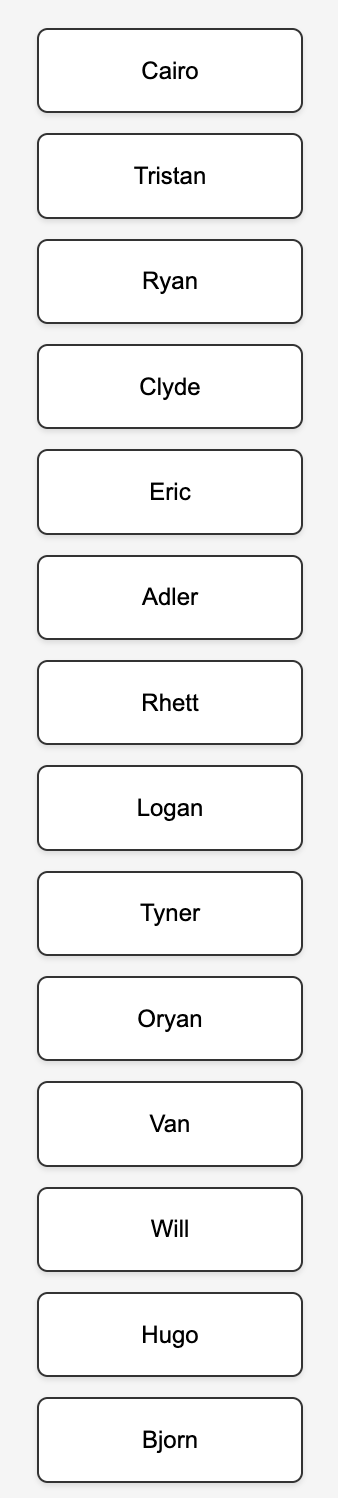
Group 1:
Cairo
Tristan
Ryan
Clyde
Eric
Adler
Rhett

Group 2: 
Logan
Tyner
Oryan
Van
Will
Hugo
Bjorn

2-4-26

Today’s schedule:
5th Period 8:30- 9:40
6th Period 9:55- 11:05
Break / “Lunch” 11:05-11:20
7th Period 11:20- 12:30

Today I will visit each of you to help you to upload:
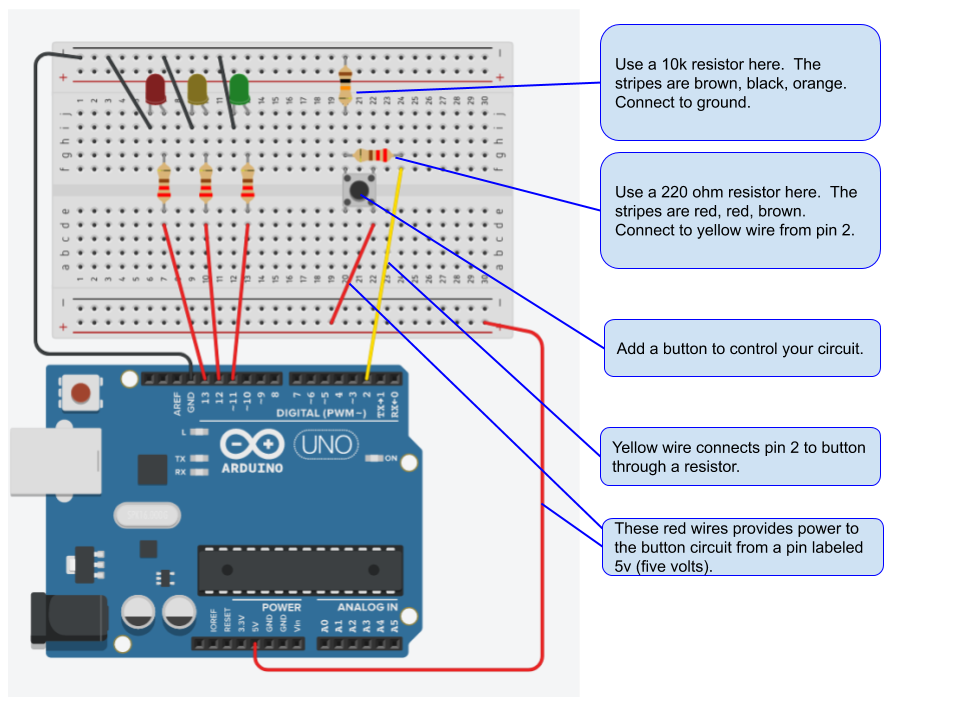
1. your  multiple, blinking LED circuit that you built and programmed in Tinkercad. uploaded to your Arduino circuit.

2. AFTER I give you a grade for this circuit, build the circuit with a button.

3. take your tinkercad program for this circuit and upload it to your Arduino.  I will visit you to grade this work.

2-3-26

Hi all – I’m home sick with the sore throat that is going around.  It will pass.

Today:
1. If you haven’t submitted a track design for printing, today is the day to submit your design.  The bottom of the assignment page has details on turning in your design on Canvas AND sending me the STL file for printing. 
2. If you have turned in a track design, check Canvas for feedback on your individual track designs.  You are making good progress but I don’t want to print first drafts until some basic design changes are made.  Like:

-Does your track have guardrails?  If they aren’t in place, add guardrails.
-Will the marble fit through the ENTIRE run?  Use the gravity feature.
-Make sure you have actual space and mounts for the magnets. Update: new magnet dimensions.  17.9mm diameter (across) and 2.8 mm thick.
Make the changes and resubmit your designs on Canvas today. 

Following the guidelines and making the changes will help your grade!

3. Once you have submitted your marble track, start work on your next project: 3d printed box. 

2-2-26

Yet another Minimum Day this Wednesday for teacher meetings:
5th Period 8:30- 9:40
6th Period 9:55- 11:05
Break / “Lunch” 11:05-11:20
7th Period 11:20- 12:30

4th period: some first drafts have printed and let’s test them out.

Demo: the Tinkercad gravity feature.

EVERYONE CHECK FOR:
1. Does your track have guardrails?  If they aren’t in place, add guardrails.
2. Will the marble fit through the ENTIRE run?  Use the gravity feature.
3. Make sure you have actual space and mounts for the magnets. Update: new magnet dimensions.  17.9mm diameter (across) and 2.8 mm thick.

5th period: there’s a good chance we will get to use real Arduinos this week.  I’m so confident that we can finish building your real circuit today.

Today we will finish building your first actual, real life, Arduino circuit.

It will be based on the multiple, blinking LED circuit that you built and programmed in Tinkercad. 

BEFORE we begin:

  1. Use components as instructed.
  2. Do not attempt to damage or damage any provided materials.
  3. Clean up after yourself and pick up any loose components – even if you they aren’t from your build.
  4. Return all components to your project box.

We won’t leave until the room is clean and all components are returned to your boxes or the bins on my desk. Even if the bell has rung.

1-30-26

Good news – we are close to a fix for the Arduino app on our computers. Some testing today and hopefully up and running next week.

Today we will keep working with servos.

We will build a circuit with a servo and add a button to control the servo.

Then you get to add your a second button and and second servo.

1-29-26

I’m over at White Hill for the first part of class today.  Talking to students about Principles of Tech to get them excited for the class.

Current assignment: Marble Track

I will be back and am excited to your progress on your designs for the Marble Track.

By the end of class today:
1. Make sure that you have talked to your upstairs and downstairs neighbors about lining up the entry and exit points for the marble.
2. Have a screenshot of your design to print so that we take a look at alignment of the whole track from top to bottom.


3d Designed Marble Wall Run

Each of you will design a segment of a marble wall track.

The marble will need to successfully travel from one segment to another.

That means you need to work with the person above and below your run to design a smooth transition from one segment to the next.

What is due today:
Your drawn plan of your marble maze segment.

What you know:
1. The marble is a 12.7mm in diameter steel ball bearing.
2. Your track will attach to the whiteboard with magnets.  Make sure you design has space for the magnets.
3. Each track segment should be no longer than 150mm from end to end.
4. Each track segment will need to be angled so the ball travels down to the next segment.
5. Each segment will attach with three magnets that are 1.5 mm thick and 30mm in diameter.
6. Each segment needs have guardrails or a tube to keep the marble in place.  A flat ramp won’t work.
7. Include something unique that shows your creativity and design skill.  This means don’t just make a tube.
Examples:
-a shape to catch the marble
-a hole to drop to the next segment
-steps
-a spinner
-????

What you need to do:
1. Check out the list below and meet your neighbors.
2. Talk with your neighbors to figure out:
>how the marble will drop
>which end will catch the marble
>which end will drop the marble
3. Then draw your design on the handout.  Click  here for some examples.

What if I am at the top or bottom of the run?
The segment in the top position will need to hold the six marbles so that they can drop one at a time.
The segment at the bottom of the stack needs to be able to catch marbles as they arrive.

Here’s the order of the track segments: