cinemagraph- a hybrid of photograph and video. Jamie Beck and Kevin Burg are the inventors of the cinemagraph. 
Let’s make some together!
- download this video of a smokestack timelapse and this video of the train platform.
- open the smokestack video in Photoshop. We will make a cinemagraph.
- open the train platform video in Photoshop. We will make another cinemagraph.
Now you get to make three cinemagraphs of your very own; please do not turn in the practice cinemagraphs that we made together. Here’s a short tutorial to review.
What to look for in your source video:
- you can find source video online at pexels.com for free video downloads.
- make sure that the camera doesn’t move at all. Avoid panning, zooming or other movement.
- timelapses with movement.
- flowing water.
- steam/smoke/vapor.
- cars moving.
- people walking.
- flames.
Where to search? I’ve had good luck at pexels.com for free video downloads.
What do you turn in on Canvas? For each of your three original cinemagraphs, turn in the file as a GIF. This is from Adobe.
Please do not turn in the practice cinemagraphs that we made together.
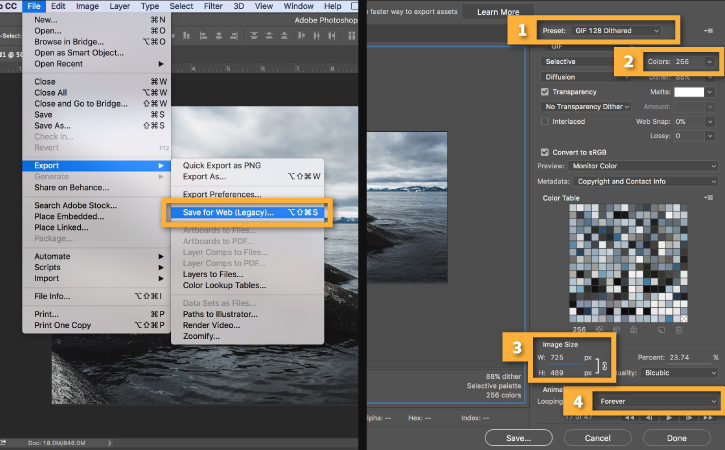
Export the animation as a GIF
Go to File > Export > Save for Web (Legacy)…
-
Select GIF 128 Dithered from the Preset menu.
-
Select 256 from the Colors menu.
-
If you are using the GIF online or want to limit the file size of the animation, change Width and Height fields in the Image Size options. Change the width to 600.
-
Select Forever from the Looping Options menu.
Click Save… and select a destination for your animated GIF file.