5-11-15 The Golf Project

Today we officially begin our mini-golf hole project.

By the end of the day you will:

  1. review the project descriptor
  2. take the project descriptor quiz
  3. demonstrate your Arduino stoplight program
  4. meet with your group and make initial decisions about job assignments

Agenda

  1. Take the quiz BY YOURSELF by clicking HERE.  You may use the project descriptor to aid you in completing the quiz.  One quiz per person. (5 points)
  2. Find your group members and click here to complete your intro survey.  This should be completed as a group.  One survey per group. (5 points)
  3. Once your group has submitted above survey then split into job alike groups.  Woodworking with Varvil.  Tinkercad and programming in the lab with Milstead.
  4. The last fifteen minutes of class: each group stands in front of the class and tells us: (5 points)
    1. name of group
    2. who is doing which job
    3. what’s the hole celebration?  What action occurs when the ball drops?
5-7-15

working with servos

1. take a serve – share as i have a limited number

2. copy paste this code into a new sketch:

#include <Servo.h>

Servo myServo;
int servoPin = 2;

void setup()
{
myServo.attach(servoPin);
}

void loop()
{
myServo.write(90);
delay(20);
}

3. connect the servo to your Arduino like this
red to 5v
black to GND
white to pin 2

run it.  What happens?  What happens if you change the number in this line: myServo.write(90);?

project wrap up – respond to these questions in a blog post

Written response to:

What is the goal of this project?

What is the learning goal of this project?

What tools were used in the making of your stoplight?

What did you learn while doing this project?

How do you feel about your project? Did you enjoy it? Was it difficult?

What would you like to learn more about?

5-4-2015

Happy Star Wars Day!! May the 4th Be With You!!

today

RGB color changing LED – you will have room on your stoplight breadboard to make this work.  Don’t remove any of your stoplight circuit.

Once you have have completed your own custom color changing sequence show me for credit.

tomorrow

1. if you want to connect your actual stoplight to your circuit bring it to class on Tuesday

2. connecting servos to Arduino and making them MOVE

4-30-15

today’s goals:

1. finish setting up your red/yellow/green stoplight with code.  Click here for breadboard setup and code.

2. write a blog post that shows a picture of your breadboard setup and your commented code.  What does commented code mean?  After each line type a // and a SHORT explanation of what is happening in that light of code.

3. once you have your stoplight working move on to part 2: adding the walk/don’t walk signal.  Click here for the breadboard setup and code.

Milstead’s group 4-28-15

today-

1. Complete and show me the BLINKING light on the Arduino and the blinking light on the breadboard.  Scroll down to yesterday’s agenda for links and details.

2. Once I have checked you off for blinking lights you may move on to setting up your stop light.  Click here for details, breadboard setup and code.  Remember, you have to comment your OWN code to tell us what is happening.

3. Finish the day with a blog post that has:
-a photo of your connected breadboard and Arduino
-your commented code copy and pasted into the blog post

Milstead’s group 4-27-15

Welcome back to 127…

today’s goal: Arduino & breadboard refresher by setting up a circuit and making the LED blink on the Arduino and breadboard

the plan:

1. each of you should pickup
-one Arduino
-one breadboard
-one cable
-one envelope

2. Write your first and last name clearly on the envelope.  At the end of class put the Arduino, breadboard and cable in the envelope.

3. breadboard refresher
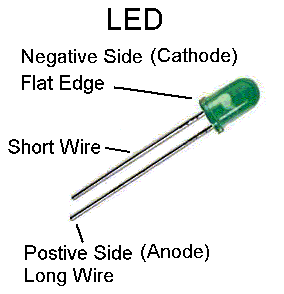
ledpositivenegative

4. blink the LED on the Arduino – follow the link

https://learn.adafruit.com/adafruit-arduino-lesson-1-blink/the-l-led

5. blink an LED on the breadboard – you will need one resistor, one LED and two jumper wires. Follow the link
https://learn.adafruit.com/adafruit-arduino-lesson-2-leds/blinking-the-led

6. Did you get the blinking to work?  Great.  Now add a second LED to the breadboard and modify your code to get both lights blinking.

Milstead’s 4-23-15

Today is our last day for breadboarding and Arduino.  On Monday you will go to Varvil and his group will come to 127.  You will have a great time working in the shop fabricating the stoplights that will connect to your breadboards.

Before the end of the day today you should have a breadboard with:

-working red yellow green lights
-a button that starts the sequence of light change
-a walk/don’t walk sign

Click here for the lowdown on the code and breadboard setup for the above.

Got all that working?  Then do these fun-filled Arduino activities:
-the color changing SINGLE LED – and this link to program custom colors
mix a photoresistor (ask me for one) and the Piezo buzzer for light controlled tones (this will be noisy and I will regret it)

Milstead’s group 4-21-15

Today your goal is to add in the walk/don’t walk lights.

You will have to do TWO things.

1. modify your breadboard.
2. modify your code.

updated breadboard
dontwalkimage dontwalkimage2

The incomplete code is available below.  Why is it incomplete?  Because the code below only controls the WALK light that comes on when the light is green.  YOU have to add in the DON’T WALK signal code.  Take a look at the code and the commented section that gives an important clue.

Here’s the INCOMPLETE CODE:

void setup() {
pinMode(13, OUTPUT);
pinMode(12, OUTPUT);
pinMode(11, OUTPUT);
pinMode(9, OUTPUT); //walk signal
pinMode(10,OUTPUT); //don’t walk signal
pinMode(2, INPUT);

}

void loop() {
if(digitalRead(2) == HIGH){

digitalWrite(11, LOW);
digitalWrite(12, HIGH);
digitalWrite(9,LOW);
delay(1000);
digitalWrite(12, LOW);
digitalWrite(13, HIGH);
digitalWrite(9,LOW);
delay(3000);
digitalWrite(13,LOW);
digitalWrite(11,HIGH);
digitalWrite(9,HIGH);
} else{
digitalWrite(11, HIGH);
digitalWrite(9, HIGH);
delay(100);
}

}

Milstead’s group 4-7-15

today:

1. review your work from yesterday – get caught up, including uploading video

2. the Stoplight Field Trip

3. Next up – incorporating a switch and taking control.

Your mission is to setup the board and Arduino to match the photos below.  Then copy/paste the code into Arduino.  Compile and upload.  Troubleshoot.

Then take the the code and comment each line to tell us what is happening. Comment like this:

//this tells the yellow light to turn on

The breadboard/Arduino controller setup

arduinoswitch1 arduinoswitch2

and the code:

void setup() {
pinMode(13, OUTPUT);
pinMode(12, OUTPUT);
pinMode(11, OUTPUT);
pinMode(2, INPUT);

}

void loop() {
if(digitalRead(2) == HIGH){

digitalWrite(11, LOW);
digitalWrite(12, HIGH);
delay(1000);
digitalWrite(12, LOW);
digitalWrite(13, HIGH);
delay(3000);
digitalWrite(13,LOW);
digitalWrite(11,HIGH);
} else{
digitalWrite(11, HIGH);
delay(100);
}

}