 Dances at 9:20
Then we return and…
create some 3d printed rings
Marble Tracks:
I’ve got a test track on the whiteboard. Let’s put them to work!
Logan – need the track and other two legs.
Tyner – just some design questions.
Adler – resize and let’s look at HOW the marble is caught from your neighbor.
Van – is the printed version the final version?
AFTER we have checked that your marble track is ready, you get to:
As promised, we get to take a break from programming and enjoy starting 3d modeling and printing.
Why?
1. It’s fun.
2. You will get to use 3d printing to build robot parts.
Click here for the Tinkercad Intro.
We will work through this together. Please follow along BEFORE you jump into your own designs.
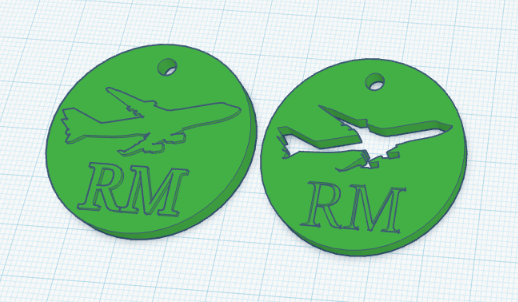
Then you get to build your OWN custom keychain that will be 3d printed.
The marble tracks are coming along. I will check in with some folks today but it’s mostly waiting for the printers.
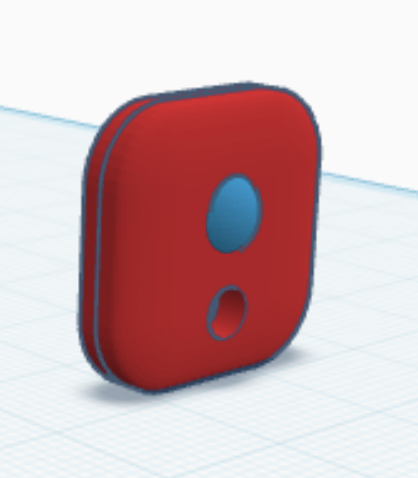
In the meantime, your next assignment is Fidget & Ball Bearing.

5th period:
Hope all of you are well!
Start with Part 1: https://rodmilstead.com/pt/2022-arduino-standard-servo-input/Links to an external site.
Then move onto Part 2: https://rodmilstead.com/pt/arduino-two-servos-two-buttons/Links to an external site.
2. Once you have these built, it’s time to make your circuit from Part 2 in real life.
4th period:
Meet with your uphill and downhill neighbors and look for:
1. Will all designs fit flat against the wall?
2. Will the marble be able to drop from one track to the next?
Your grade on this project will be partly based on the successful transfer of the marble from one track to another. Now is the time to make adjustments.
Make changes to your design after you meet with your track neighbors. Then resubmit on the Google form right here:
Here’s how to convert files to STL:
-in Tinkercad click the EXPORT button in the top right hand corner. Choose STL as the file format. Pay attention to where the file downloads on your computer. -make sure that the file has your last name (like milsteadcompleteshape.svg). No name=no 3d print.
When you are done click here to submit your design.
So I’m staying out sick again. This cough is no joke and I don’t want to share it with any of you.
Build these circuits in Tinkercad and turn in the link for your completed Part 2 circuit on Canvas.
Start with Part 1: https://rodmilstead.com/pt/2022-arduino-standard-servo-input/Links to an external site.
Then move onto Part 2: https://rodmilstead.com/pt/arduino-two-servos-two-buttons/Links to an external site.
Marble Track Feedback – each of you will give feedback on seven other marble tracks that are not YOUR DESIGN.
AFTER we have finished our feedback round, revise your designs based on feedback and the guidelines in Marble Track Revision.
Group 1:
Cairo
Tristan
Ryan
Clyde
Eric
Adler
Rhett
Group 2:
Logan
Tyner
Oryan
Van
Will
Hugo
Bjorn
Today’s schedule:
5th Period 8:30- 9:40
6th Period 9:55- 11:05
Break / “Lunch” 11:05-11:20
7th Period 11:20- 12:30
Today I will visit each of you to help you to upload:
1. your multiple, blinking LED circuit that you built and programmed in Tinkercad. uploaded to your Arduino circuit.
2. AFTER I give you a grade for this circuit, build the circuit with a button.
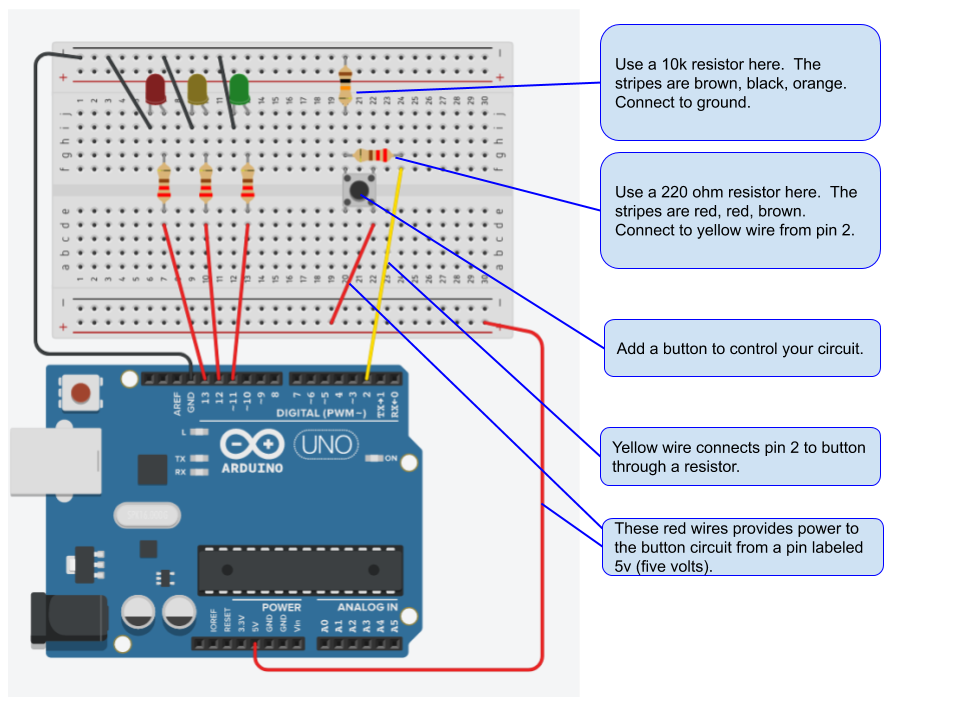
3. take your tinkercad program for this circuit and upload it to your Arduino. I will visit you to grade this work.
 Hi all – I’m home sick with the sore throat that is going around. It will pass.
Today:
1. If you haven’t submitted a track design for printing, today is the day to submit your design. The bottom of the assignment page has details on turning in your design on Canvas AND sending me the STL file for printing.
2. If you have turned in a track design, check Canvas for feedback on your individual track designs. You are making good progress but I don’t want to print first drafts until some basic design changes are made. Like:
-Does your track have guardrails? If they aren’t in place, add guardrails.
-Will the marble fit through the ENTIRE run? Use the gravity feature.
-Make sure you have actual space and mounts for the magnets. Update: new magnet dimensions. 17.9mm diameter (across) and 2.8 mm thick.
Make the changes and resubmit your designs on Canvas today.
Following the guidelines and making the changes will help your grade!
3. Once you have submitted your marble track, start work on your next project: 3d printed box.
Yet another Minimum Day this Wednesday for teacher meetings:
5th Period 8:30- 9:40
6th Period 9:55- 11:05
Break / “Lunch” 11:05-11:20
7th Period 11:20- 12:30
4th period: some first drafts have printed and let’s test them out.
Demo: the Tinkercad gravity feature.
EVERYONE CHECK FOR:
1. Does your track have guardrails? If they aren’t in place, add guardrails.
2. Will the marble fit through the ENTIRE run? Use the gravity feature.
3. Make sure you have actual space and mounts for the magnets. Update: new magnet dimensions. 17.9mm diameter (across) and 2.8 mm thick.
5th period: there’s a good chance we will get to use real Arduinos this week. I’m so confident that we can finish building your real circuit today.
Today we will finish building your first actual, real life, Arduino circuit.
It will be based on the multiple, blinking LED circuit that you built and programmed in Tinkercad.
BEFORE we begin:
We won’t leave until the room is clean and all components are returned to your boxes or the bins on my desk. Even if the bell has rung.