This project uses the following tools in Inkscape:
>fill and stroke
>drawing shapes
>pen tool
>node tool
The real purpose of this project is to improve your skills using the Inkscape pen tool. The pen tool is found in all major graphics programs and is amazingly useful.
Scroll down to see how this will be graded or to watch a tutorial.
Your mission is to create a laser cut puzzle with
>no larger than seven by nine inches
>round or square border
>smooth puzzle pieces that do not overlap – like THIS example – NOT like this example
>at least ten puzzle pieces
>at least one image
>a cut line for the border
>cut lines for all the pieces
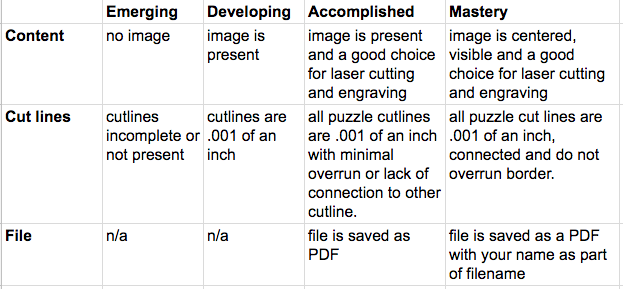
>all cut lines and border must be .001 of an inch (one thousandth of an inch) or it will not cut
>use File, Document properties to shrink your document to fit your puzzle
Need help? Watch a tutorial:
-how to make a laser cut puzzle using Inkscape
-set the cutline to one thousandth of inch
-import a file into Inkscape and center it on your shape
-before you print: set the margins of your document AND save as PDF
Save your puzzle as as PDF with your last name like: milsteadpuzzle.pdf
Click here to submit to your file for laser cutting
How will this be graded?